Showing posts with label Web Technologies. Show all posts
Showing posts with label Web Technologies. Show all posts
Sunday, March 27, 2011


Friday, March 25, 2011

Monday, March 21, 2011
IMP Questions for PHP / HTML

- Give the difference between $_GET and $_POST
$_GET is less secure and effective than $_ POST, $_GET has few limitations like it can send about 100 words of data at a time, whereas $_POST does not have such kind of limitations, we can send any amount of data using this variable. $_POST is more secure than $_GET in the means of that whenever we send data from one web page to another using $_GET variable we can see the values in address bar, on the contrary $_POST does not allow any thing to be displayed in address bar of the browser.
- What is cookie? Explain with example.

- Explain in detail advantages of PHP
PHP is one of the most popular server side scripting languages running today. It is used for creating dynamic webpages that interact with the user offering customized information. PHP offers many advantages; it is fast, stable, secure, easy to use and open source (free).
- Explain PHP variables and also explain why PHP is a loosely typed language?
Variables are used for storing values, like text strings, numbers or arrays. When a variable is declared, it can be used over and over again in your script. All variables in PHP start with a $ sign symbol. The correct way of declaring a variable in PHP: $var_name = value;
In the example above, you see that you do not have to tell PHP which data type the variable is.
PHP automatically converts the variable to the correct data type, depending on its value.
In a strongly typed programming language, you have to declare (define) the type and name of the variable before using it.
- Give syntax of date() function.
Syntax
date(format,timestamp)
- Give syntax of mktime() function
Syntax
mktime(hour,minute,second,month,day,year,is_dst)
- Write the Inbuilt function that reverses the string.
strrev(string)
- Write the Inbuilt Function that converts the string to Uppercase.
strtoupper(string)
- When we can use $REQUEST variable?
The PHP built-in $_REQUEST function contains the contents of both $_GET, $_POST, and $_COOKIE.
The $_REQUEST function can be used to collect form data sent with both the GET and POST methods.
- All variables in PHP starts with a ________ sign symbol. Ans. $
- _________ is used to print text in php page. - Echo
- PHP is server side scripting language because.........(complete the statement)
- What is an array ? List the types of array.
- Numeric array - An array with a numeric index
- Associative array - An array where each ID key is associated with a value
- Multidimensional array - An array containing one or more arrays
- Explain for loop with example.
The for loop is used when you know in advance how many times the script should run.
Syntax
for (init; condition; increment){
code to be executed;
}
- Give an example of a function that returns a value.
- Major difference between include() and require() functions.
- List 3 different function used to open, close, and checking end-of particular file.
- Difference between PHP and HTML
- What is an anchor tag?
- How can we add image in HTML document?

Monday, March 14, 2011
Learn Database Connection in PHP in 15mins (15-Steps)
I tried to make this article more simple and interactive for you......
To learn the database connection in PHP, you have to follow some easy steps which are described below.
But make sure that you have installed the "WAMP SERVER" in your PC.
Step 1: Start the WAMP server


Step 7: Give the name of the table and number fields like shown in the figure..................


Step 9: Then Click On Save Button.......and it will show a page like below........



To learn the database connection in PHP, you have to follow some easy steps which are described below.
But make sure that you have installed the "WAMP SERVER" in your PC.
Step 1: Start the WAMP server

(Fig shows the WAMP latest version 2.1 )
Step 2: Click on WAMP server icon from notification bar and select "phpMyAdmin".......
Step 3: It will show like this......

Step 4: Click On "Databases"

Step 5: Write your database name in textbox under "Create new database" below:

Step 6: Then message "Database db1 has been created" will be displayed.....

Step 7: Give the name of the table and number fields like shown in the figure..................

Step 8: Give name, datatype and primary key to fields...................


Step 9: Then Click On Save Button.......and it will show a page like below........

Step 10: Now Click On Insert Tab for inserting data into table................

Step 11: Write the values in the value fields and other part remains blank..........

Step 12: Click on Go below of the second data field.........

Step 13: Now your data are inserted into the table

Step 14 (a): Now open a Notepad file..................

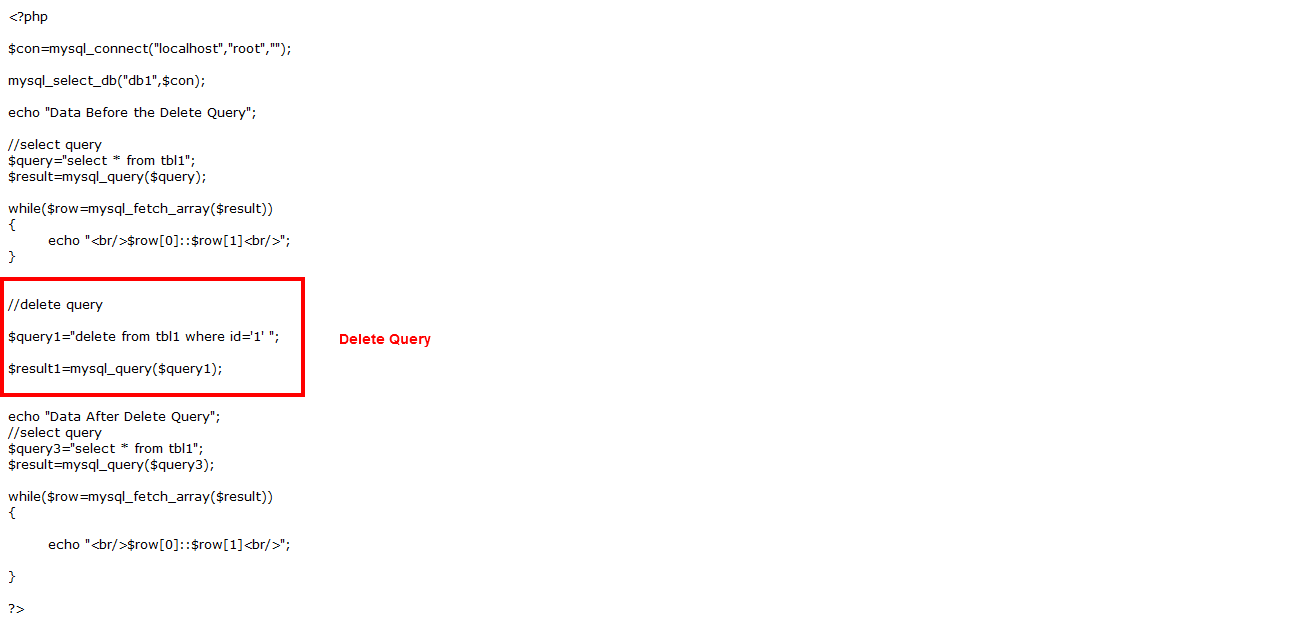
Step 14 (b): Write the same code which is given below:
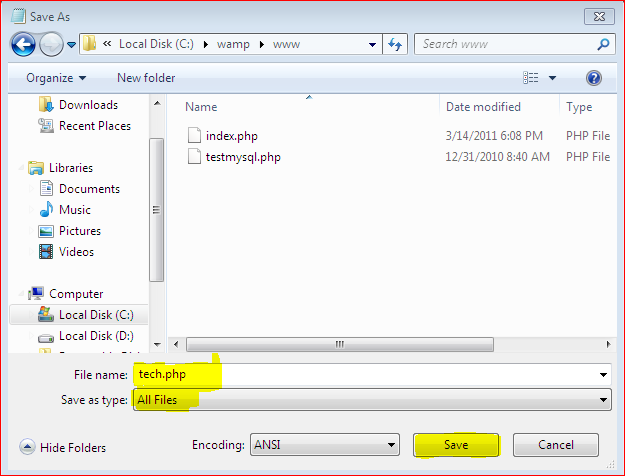
Step 14 (c): Save notepad file in WAMP folder: "C:\wamp\www\"
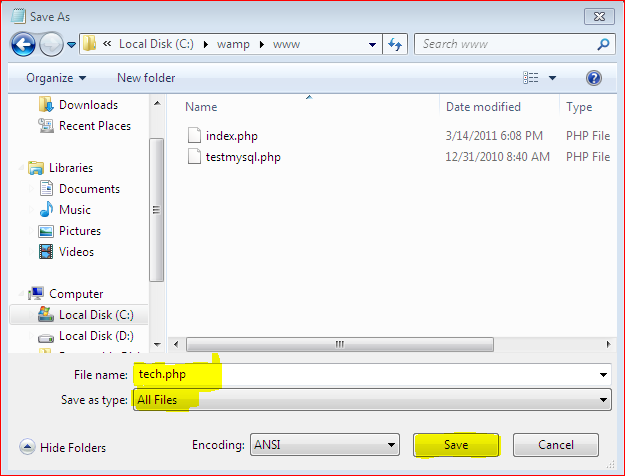
Step 15: Final Step:
Now execute your file in WAMP - Local Host.............

Thursday, March 10, 2011
File Handling in PHP
<?php
$file1=fopen("welcome text", "r"); \\open a file and write text in file.......
fclose($file1);
?>
$file1=fopen("welcome text", "r"); \\open a file and write text in file.......
fclose($file1);
?>
| Modes | Description |
|---|---|
| r | Read only. Starts at the beginning of the file |
| r+ | Read/Write. Starts at the beginning of the file |
| w | Write only. Opens and clears the contents of file; or creates a new file if it doesn't exist |
| w+ | Read/Write. Opens and clears the contents of file; or creates a new file if it doesn't exist |
| a | Append. Opens and writes to the end of the file or creates a new file if it doesn't exist |
| a+ | Read/Append. Preserves file content by writing to the end of the file |
| x | Write only. Creates a new file. Returns FALSE and an error if file already exists |
| x+ | Read/Write. Creates a new file. Returns FALSE and an error if file already exists |
Monday, January 31, 2011


Wednesday, January 26, 2011
PHP Simple Programs
Recommended Software: wamp server Click Here 2 Download wampserver !!
Write code in Notepad
And save into www directory of wamp. You can find it from "c:\wamp\www".
Save your notepad file with .php extension...
For example "demo.php" and select "All files" from save as type and click on save button.
Program 1:

Output:
100 is greater than 10
Program 2:

Output:
0
1
2
3
4
5
6
7
8
9
10
Author : Technology Stuff: At present 2 Upcoming
Write code in Notepad
And save into www directory of wamp. You can find it from "c:\wamp\www".
Save your notepad file with .php extension...
For example "demo.php" and select "All files" from save as type and click on save button.
Program 1:

Output:
100 is greater than 10
Program 2:

Output:
0
1
2
3
4
5
6
7
8
9
10
Author : Technology Stuff: At present 2 Upcoming
Saturday, January 22, 2011

Tuesday, January 18, 2011
PHP Tutorial
Introduction:
- PHP is a powerful tool for making dynamic and interactive web pages.
- PHP is the widely-used, free, and efficient alternative to competitors such as Microsoft's ASP.
- PHP stands for Hypertext Preprocessor
- PHP is a server side scripting language.
- PHP supports many databases like MySQL, Informix, Oracle, Sybase, Solid etc.
- PHP is an open source software
- PHP is free to download and use
Friday, January 7, 2011

Thursday, December 16, 2010


Tuesday, November 23, 2010



WYSIWYG (What You See Is What You Get) Editors
- ASP.NET Web Matrix
- Adobe Dreamweaver
- Amaya
- BestAddress HTML Editor
- CoffeeCup HTML Editor
- FirstPage
- Freeway
- Hyper Publish
- iWeb
- KompoZer
- Microsoft Expression Web
- Microsoft SharePoint Designer
- Microsoft Visual Studio
- Microsoft Visual Web Developer Express
- Microsoft Publisher
- NetObjects Fusion
- OpenBEXI
- Opera Dragonfly
- Quanta Plus
- RapidWeaver
- Sandvox
- SeaMonkey Composer
- SiteGrinder
- tkWWW
- WebPlus
- WordPress
- WorldWideWeb
List of Text Based Editors
System default
- E (E.EXE) (default under IBM OS/2 versions 2-4)
- gedit (default under GNOME)
- Kate (default under KDE)
- Leafpad (default under LXDE)
- Mousepad (default under Xfce)
- Notepad (default under Microsoft Windows)
- SimpleText (default under Classic Mac OS)
- TextEdit (default under Mac OS X)
- XEDIT (default under VM/CMS)
Free software
- Acme — A User Interface for Programmers by Rob Pike
- AkelPad - Еditor for plain text. It is designed to be a small and fast. Many plugins.
- Bluefish — Web development editor
- Caditor - Portable text editor with line numbering and syntax highlighting
- Crimson Editor
- Geany — fast and lightweight editor / IDE, uses GTK+
- gedit — a simple GNOME text editor, fairly equivalent to KEdit
- J - Text editor written in Java, part of the ArmedBear Common Lisp (ABCL) project
- jEdit — free cross-platform programmer's editor written in Java, GPL licensed
- JOVE — Jonathan's Own Version of Emacs
- JuffEd — lightweight text editor written in Qt4
- Kate — basic text editor for the KDE desktop
- Kedit — KDE editor roughly similar in sophistication to Windows Notepad, but with a spellchecker
- Kile — User friendly TeX/LaTeX editor
- KWrite — default editor on KDE, more sophisticated than KEdit
- Leafpad
- Leo — a text editor that features outlines with clones as its central tool of organization and navigation
- mcedit - text editor provided with Midnight Commander
- Metapad - Windows Notepad replacement, GPL licensed
- MicroEMACS
- NEdit — 'Nirvana Editor'
- Notepad++ — a tabbed text editor
- Notepad2
- Pe — a text editor for BeOS
- Programmer's Notepad
- RText
- Sam
- SciTE
- Scribes
- Smultron — a Mac OS X text editor
- TeXnicCenter
- The Hessling Editor
- UniRed — Windows text editor supporting many encodings
- X11 Xedit
- Yudit
Freeware
- Arachnophilia
- BBEdit Lite
- ConTEXT
- Eddie — A text editor originally made for BeOS and later ported to Linux and Mac OS X.
- GX Text
- Komodo Edit
- LEd — LaTeX Editor
- Notepad+
- NoteTab Light
- Programmer's File Editor (PFE)
- PSPad editor
- RJ TextEd
- q10 — Full screen text editor (Windows)
- TED Notepad
- TeXShop — TeX/LaTeX editor and previewer
- TextWrangler
Personal license (free for individuals)
- HTML Kit
Proprietary
- Alphatk
- BBEdit
- CodeWright
- GoldED (text editor of Cubic IDE)
- CygnusEd (CED)
- E Text Editor
- EditPlus
- EmEditor
- Epsilon
- GWD Text Editor
- Inlage LaTeX Editor
- Kedit text editor with commands and Rexx macros similar to IBM Xedit
- MED
- NoteTab
- PolyEdit
- skEdit (formerly called skHTML)
- SlickEdit
- Source Insight
- SubEthaEdit (formerly called Hydra)
- Tex-Edit Plus
- TextMate
- TextPad and Wildedit
- The SemWare Editor (TSE) (formerly called QEdit)
- TopStyle
- UltraEdit
- Ulysses
- VEDIT
- WinEdt
Subscribe to:
Posts (Atom)