Showing posts with label Multimedia. Show all posts

Sunday, March 27, 2011

How to make button in Flash

In flash we are going to develop an application which is having button to play like shown below.........


Example : Click on Play Button below:::


So to make like this you have to follow some steps which are described below:

Step 1: Start the Flash Macromedia Software


  • Before making button add one stage. (From Insert Menu > Select Scene)
  • Make some application on stage 2 like masking or shape tween ( In scene 2 )
  • Now come back to scene 1

Step 2:  Make Square Shape in the stage. ( You can make rectangle or any type of symbol ) 


Step 3:  Click the right button on the drawing and select "Convert to Symbol" option.


Step 4:  And Select the Button Option and give the name of the button:


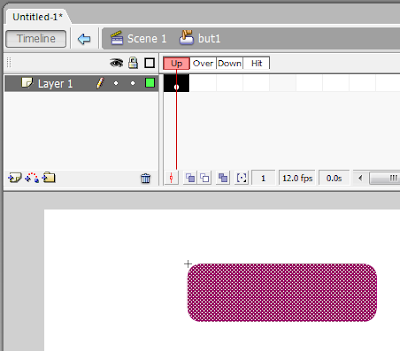
Step  5:  Now double click on the stage (white portion) then you will redirect to button Timeline which is shown below


Step 6:  Write some text on the button and then double click on stage (white portion)

(Button Stage)

(Application Stage)

Step 7:  Now select first frame and right click on it, then select Action option


Step 8: Now you should double click on "Stop" from left hand side bar....


Step 9: Now right click on the button and select Action option 


Step 10:  Now select option as shown in the figure below:


Step 11: Now select Goto Option from the left hand side bar.....


Step 11(a) : Now select the Scene no  that you want to go after clicking the button but therefore you have to make another scene before making the button.....

Now your button is ready you can test it by pressing "Ctrl  + Enter"

Wednesday, February 16, 2011

Imp Full Form for Multimedia

BMP -   Bitmap Image File
DIB  -   Device Independent Bitmap 
JPG -    Joint Photographic Expert Group
PCX -   Picture Exchange Format
PSD -   Photoshop Standard Document
PCD -   Photo CD File
RBG -  Red Blue Green
MIDI -  Musial Instrument Digital Interface
OCR -   Optical Character Recognition
OMR -  Optical Mark Recognition or Optical Mark Reader
AI -       Adobe Illustrator
CDR-    Corel Draw
CGM -   Computer Graphics Metafile
IPG - Interactive Program Guide
  

Saturday, January 22, 2011

First Flash Game

Click on the balloon............have fun...!!  


                                                               -Maulik Dave

Tuesday, January 11, 2011

MULTIMEDIA QUESTION BANK

TYPE 1: ONE WORD ANSWERS


1. Combination of different media to communicate ideas 
     - Multimedia


2. Art of producing movement to static objects
    - Animation


3. Data which is stored in binary format ??


4. A multimedia application which allows the user to interact in some way or other ??

5. A methodology of teaching academic curriculum , in an interesting and entertaining manner ??

6. Device which converts analog signal to digital signal
    - ADC (Analog to Digital Converter)


7. The card which is used for graphic acceleration
   - Graphics Card


8. The software used for installing and configuring multimedia peripherals ???

9. The tools used for creating/editing digital multimedia data ??

10. The tools which are used for encoding/decoding multimedia contents and for converting one file to another ??

Saturday, January 8, 2011

Multimedia Project Documentation


Download the documentation of multimedia project and get reference from it. You should have RAR software to open this file. If you want to install RAR software click below and use it......


This file is just example of previous year student's multimedia project. So try to make better than this one.

Thursday, December 23, 2010

Masking in Flash


(C) Technology Stuff: At present 2 Upcoming


STEPS TO FOLLOW

Inserting Layers and Naming them
  • By default you will have a layer in your timeline window. Insert one more layer, totally you need two layers to mask an object.
  • Rename the top layer to "Mask" and the layer below that to "background".
Creating Shape Tween
  • Import your picture to the "background" layer.
  • Using Oval tool from your tool box, draw a circle in your "Mask" layer and delete it's border.
  • Drag the circle to one end of your picture.
  • Now go to"frame 40" of your "Mask" layer and press "F6" to insert a new keyframe.
  • Now go to "frame 40" of your "background" layer and press "F5" to insert frames, so that your background image is available all through your mask.
  • Select "frame 40" of your "Mask" layer, that is your new keyframe, Keeping the playhead on "frame 40" of "Mask" layer, drag the circle to other end of your picture.
  • Now go back to "frame 1" of your "Mask" layer, keeping the playhead on "frame 1" of your "Mask" layer, select Shape tween in your properties window.
Masking
  • Right click on the "Mask" layer (the area where you named the layer not where the frames exist) and select Mask.
Your Mask is all ready. Press Ctrl+Enter to view your Mask.

Thursday, December 9, 2010

OCR (Optical Character Recognition)

Optical Character Recognition (OCR) is a process of converting printed materials into text or word processing files that can be easily edited and stored. The technology has enabled such materials to be stored using much less storage space than the hard copy materials. OCR technology has made a huge impact on the way information is stored, shared and edited. Prior to optical character recognition, if someone wanted to turn a book into a word processing file, each page would have to be typed word for word.

OCR (optical character recognition) is the recognition of printed or written text characters by a computer. This involves photoscanning of the text character-by-character, analysis of the scanned-in image, and then translation of the character image into character codes, such as ASCII, commonly used in data processing.


Applications of Optical Character Recognition

  • Personal digital assistant (PDA)
  • Digital camcorder
  • Data acquisition systems
  • KVM switch
  • Laser printer
  • Flatbed scanner
  • Digital camera
  • Data logger
  • CCD image sensors
  • Electronic dictionary
  • Touch screen monitor
  • Security camera
  • Barcode scanner
  • Signal converters
  • CMOS image sensor
  • Computer speakers
  • USB connector
  • Machine vision system
  • Wireless keyboard
  • Video phone
  • Analog to digital converter
  • Computer cables
  • Handheld document scanner
  • Spectrum analyzer
  • Computer cases
  • Fax machine
  • Digital oscilloscope
  • Pressure sensor
  • Inkjet printer
  • PIN & avalanche photodiode
  • USB cable
  • Color laser printer
  • Load cell
  • RFID reader
  • Computer mouse
  • USB hub
  • Fingerprint scanner, fingerprint reader
  • Digital filter
  • Desktop, laptop computer keyboard
  • Business card scanner
  • PCMCIA PC card
  • Digital to analog converter
  • Memory card: Compact Flash, Memory Stick, SD card
  • Laptop docking station
  • Label printer
  • Wireless telemetry system
  • SCSI cables
  • Multifunction (all in one) printer
  • Data recorder
  • Optical mouse
  • Tire pressure monitoring system (TPMS)
  • Portable barcode printer
  • Strip chart recorder
  • Tablet PC
  • Large format printer
  • Thermal printer
  • CompactPCI system