Thursday, November 29, 2012


Turing Award: the Nobel of a Computer Science
Winning a Nobel award is an ultimate dream of any scientist in his life. Computer Science and technology is one of the most competitive and fast growing fields in the world. Large numbers of corporate companies have invested billions of money in research and development (R&D) in the field of computer science. Now we can imagine the number of scientist has participated in this research. From all over the world and including many multinational brands like Google Inc., Apple Inc., Microsoft Inc., IBM Inc., Amazon Inc., and many more. So, is there any award available for a computer science? And the answer is The Turing Award. Turing Award is considered as the Nobel prize of a Computer Science. It is named after well known British mathematician, logician and computer scientist Alan Mathison Turing.
A prize of $ 2,50,000 is accompanied with the award. The financial support for the award is provided by the Google Inc and Intel Inc,. Here, we have an interesting and a surprising news for us. Mr. Raj Reddy is the only and first Indian who is praised by Turing award. He received the honour of being first Asian.

Saturday, October 6, 2012
What Is a Locale ? (JAVA)
Courtesy: JAVA Internationalization
- Andrew Deitsch & David Czarnecki
In software internationalization, we use the term locale when we talk about local markets. A locale embraces a specific language in combination with a given cultural, geographical and political region. A French Canadian locale refers to the French Speaking part of Canada (Quebec Province), and is associated with the language and information such as the date, currency, and number formats for that particular region. A different local would be used for the English speaking part of Canada. In addition to the language and formatting information, important data that you might not immediately associate with a locale is usually included, such as:
Working with the Locale Class :
The Locale class in Java is easy to use. It is meant to be an identification class that is ultimately used by other classes performing locale-sensitive operation.
- Andrew Deitsch & David Czarnecki
In software internationalization, we use the term locale when we talk about local markets. A locale embraces a specific language in combination with a given cultural, geographical and political region. A French Canadian locale refers to the French Speaking part of Canada (Quebec Province), and is associated with the language and information such as the date, currency, and number formats for that particular region. A different local would be used for the English speaking part of Canada. In addition to the language and formatting information, important data that you might not immediately associate with a locale is usually included, such as:
- Names of the months
- Days of the week
- The first day of the week
- Collation sequencing (sort order)
- Time zone information
- A language
- A country or region
- An optional variant
Working with the Locale Class :
The Locale class in Java is easy to use. It is meant to be an identification class that is ultimately used by other classes performing locale-sensitive operation.
Monday, October 1, 2012
JSP Implicit Objects
Implicit Objects in JSP are
those objects which are created/instantiated implicitly by the JSP
Engine or the container (part of the underlying Web Container and the container makes them available to the developers,) as a convenience feature
for the JSP page writers who can use them without having to instantiate
them. The developer do not need to create them explicitly. Since these objects are created automatically by the container and are
accessed using standard variables; hence, they are called implicit
objects. The implicit objects are parsed by the container and inserted
into the generated servlet. But we can pass them to our own method if we
wish to use them locally in those functions. These implicit objects implement the interfaces defined in the
JSP/Servlet APIs.
There are nine implicit objects:
| Object | Class |
| Application | Javax.servlet.ServletContext |
| Config | Javax.servlet.ServletConfig |
| Exception | Java.lang.Throwtable |
| Out | Javax.servlet.jsp.JspWriter |
| Page | Java.lang.Object |
| PageContext | Javax.servlet.jsp.PageContext |
| Request | Javax.servlet.ServletRequest |
| Response | Javax.servlet.ServletResponse |
| Session | Javax.servlet.http.HttpSession |
1. Session: Session object has a session scope that is an instance of javax.servlet.http.HttpSession class. Perhaps it is the most commonly used object to manage the state contexts. This objects persists information across multiple user connection.
2. Responce: This object has a page scope that allows direct access to the HTTPServletResponce class object. Responce object is an instance of the classes that implements the javax.servlet.ServletResponse class. Container generates to this object and passes to the _jspService() method as a parameter.
3. Request: Request object has a request scope that is used to access the HTTP request data, and also provides a context to associate the request-specific data. Request object implements javax.servlet.ServletRequest interface. It uses the getParameter() method to access the request parameter. The container passes this object to the _jspService() method.
4. Pagecontext: PageContext has a page scope. Pagecontext is the context for the JSP page itself that provides a single API to manage the various scoped attributes. This API is extensively used if we are implementing custom tag handlers. PageContext also provides access to several page attributes like including static or dynamic resource.
5. Page:This object has a page scope and is an instance of
the JSP page's servlet class that processes the current request. Page object
represents the current page that is used to call the methods defined by the
translated servlet class. First type cast the servlet before accessing any
method of the servlet through the page.
6. Application: These objects has an application
scope. These objects are available at the
widest context level, that allows to share the same information between the
JSP page's servlet and any Web components with in the same application.
7. Config: These object has a page scope and is
an instance of javax.servlet.ServletConfig class. Config object allows to pass the
initialization data to a JSP page's servlet. Parameters of this objects can
be set in the deployment descriptor (web.xml) inside the element <jsp-file>.
The method getInitParameter() is used to access the initialization
parameters.
8. Exception: This object has a page scope and
is an instance of java.lang.Throwable class. This object allows the
exception data to be accessed only by designated JSP "error
pages."
9. Out: This object allows us to access the
servlet's output stream and has a page scope. Out object is an instance of
javax.servlet.jsp.JspWriter class. It provides the output stream that enable
access to the servlet's output stream.
Tuesday, August 28, 2012
GATES AND BOOLEAN ALGEBRA
Courtesy: Structured Computer Organization (5th Edition)
by Andrew S. Tanenbaum
Digital circuits can be constructed from a small number of primitive elements by combining them in innumerable ways.
1. GATES
A digital circuit is one which only two logical values are present. Typically, a signal between 0 and 1 volt represents one value (e.g. binary 0) and a signal between 2 to 5 volt represents other value (e.g. binary 1). Voltage outside these two ranges are not permitted . Tiny electronic devices, called gates , can compute various functions of these two-valued signals. The transistor has three connections to outside the world: the collector, the base, the emitter. When the input voltage, Vin, is below a certain critical value, the transistor turns off and acts like an infinite resistance. When Vin exceeds the critical value, the transistor switches on and acts like wire, causing Vout to be pulled down to ground.
by Andrew S. Tanenbaum
Digital circuits can be constructed from a small number of primitive elements by combining them in innumerable ways.
1. GATES
A digital circuit is one which only two logical values are present. Typically, a signal between 0 and 1 volt represents one value (e.g. binary 0) and a signal between 2 to 5 volt represents other value (e.g. binary 1). Voltage outside these two ranges are not permitted . Tiny electronic devices, called gates , can compute various functions of these two-valued signals. The transistor has three connections to outside the world: the collector, the base, the emitter. When the input voltage, Vin, is below a certain critical value, the transistor turns off and acts like an infinite resistance. When Vin exceeds the critical value, the transistor switches on and acts like wire, causing Vout to be pulled down to ground.
Wednesday, March 7, 2012
Installation of SQL Server 2005
| 1. Insert the DVD into the DVD drive and double-click on the icon: | |||||||||||||||||||||||||||||||||
 | |||||||||||||||||||||||||||||||||
| 2. The installation screen should appear: | |||||||||||||||||||||||||||||||||
 | |||||||||||||||||||||||||||||||||
| For most installations, if installing on standard 32 bit Windows XP Professional, click on the x86-based operating systems option. | |||||||||||||||||||||||||||||||||
| 3. Click on Server components, tools, Books online and samples: | |||||||||||||||||||||||||||||||||
 | |||||||||||||||||||||||||||||||||
| 4. Read the terms and conditions of the license agreement and click the check box to accept them: | |||||||||||||||||||||||||||||||||
 | |||||||||||||||||||||||||||||||||
| Then click Next. | |||||||||||||||||||||||||||||||||
| 5. The Installing Prerequisites screen appears: | |||||||||||||||||||||||||||||||||
 | |||||||||||||||||||||||||||||||||
| Click on the Install button and wait whilst the system components are configured. This may take 10-20 seconds. | |||||||||||||||||||||||||||||||||
| 6. Once the prerequisites are installed, click on Next: | |||||||||||||||||||||||||||||||||
 | |||||||||||||||||||||||||||||||||
| 7. Wait for a few seconds for the following screen to appear, and then click on Next: | |||||||||||||||||||||||||||||||||
 | |||||||||||||||||||||||||||||||||
| 8. The System Configuration Check screen appears: | |||||||||||||||||||||||||||||||||
 | |||||||||||||||||||||||||||||||||
| If the configuration check completes successfully (Success appears in the top panel, all ticks in the Details panel), click on Next. | |||||||||||||||||||||||||||||||||
| 9. Fill in the Registration Information details: | |||||||||||||||||||||||||||||||||
 | |||||||||||||||||||||||||||||||||
| Click on Next. | |||||||||||||||||||||||||||||||||
| 10. Select the components to install: | |||||||||||||||||||||||||||||||||
 | |||||||||||||||||||||||||||||||||
| Note that the components selected in the screen shot above are the most common components that will be needed for most developers and development DBAs. However, if another component such as Analysis Services is needed, it can be added easily afterwards by re-inserting the installation DVD and re-running the setup program.Click on the Advanced button to open up further options. | |||||||||||||||||||||||||||||||||
| 11. The advanced Features Selection screen opens: | |||||||||||||||||||||||||||||||||
 | |||||||||||||||||||||||||||||||||
| IMPORTANT NOTE As a general rule it is not necessary to change the default installation path or the Developer Edition installation, unless your organization has a standard which is different. If in doubt, check an existing PC or server at your site.Click on Next.
|


Tuesday, October 18, 2011
What is EDI ?
Electronic Data Interchange, or EDI, is not a new technology and in fact has been around since the late 1960s. While EDI has benefited enormously from advances in technology, eg the introduction of the internet, EDI is not technology dependant. There are preferred ways to implement EDI in a company, but there are many approaches to choose from. The approach chosen should be driven by a company’s business needs, not a particular implementation or technology.
In its simplest form, EDI is the computer to computer exchange, between two companies, of standard business documents in electronic format. There are two key elements in basic EDI. First, electronic documents replace paper based ones. Second, the exchange of documents takes place in a standardised format. Using these two basic concepts, any business can enter the world of EDI and begin taking advantage of the speed and economy of electronic commerce, or e-Commerce.

In today’s fast-paced business world, your business may already be moving in this direction, customers or suppliers may already be approaching you to begin trading information electronically. For the newcomer to EDI, it may seem a very confusing subject area.
So what is a document? A document is any form of communication, usually paper based, sent between two companies, examples include:
- Purchase Orders
- Invoices
- Shipping Notices
- Export / Import Notices
- Carrier to carrier waybills
- Funds transfer
- Design specifications
- Health insurance claims
EDI is essentially a data processing concept which is independent of communication protocols or transmission media. EDI is a logical outgrowth of the standard computerisation going on within companies over the last few decades. With EDI, the type of electronic communication between departments within a company can now easily be extended to reach out to other companies or trading partners.
EDI replaces human readable, paper or electronic based documents with machine readable, electronically coded documents. With EDI, the sending computer creates the message and the receiving computer interprets the message without any human involvement at all.
Before learning about what makes up an EDI system and how to implement one, it is important to look at an example that highlights some of the key differences between traditional paper document transactions and EDI. One of the first places where many companies implement EDI is in the exchange of a purchase order, (PO). In the traditional method of processing a purchase order, a buyer or purchasing agent will go through a fairly standard procedure to create a purchase order, consisting of the following steps:
- A buyer reviews data from an inventory or planning system
- The buyer enters data into a screen in the purchasing system to create a PO
- The buyer waits for the PO to be printed, usually on a special form
- After the PO is printed, the buyer mails it to the vendor
- The vendor receives the PO and posts it in their order entry system
- The buyer calls the vendor periodically to determine if the PO has been received and processed
When you add up the internal processing time required by the sender and receiver, and then add a couple of days in the mail, this process normally takes between three and five days. This assumes first that both the sender and receiver handled the PO quickly and that at every point along the way there were no errors in transcribing data from a form to a system.

Now consider the same document exchange when a company places its purchase orders electronically using EDI:
- The buyer reviews the data and creates the PO, but does not print it
- EDI software creates an electronic version of the PO and transmits it automatically to the sender within minutes
- The vendor’s order entry system receives the PO and updates the system immediately upon receipt
What took up to five days with paper and the postal system has just taken less than one hour. By eliminating the paper handling from most of the stages of the process, EDI has the potential to transform a traditional paper based process to look like this:

The major benefits of implementing EDI within your business are discussed in more detail in the ‘Benefits of EDI’ section of this Microsite but in summary EDI can help improve speed and accuracy of transactions, reduce costs and it provides improved flexibility when interacting on a daily basis with your trading partners or customers. To find out how to implement an EDI system, please choose the ‘Implementing EDI’ button from the menu above.
Saturday, July 30, 2011
Dialog Box in JAVA
import javax.swing.JOptionPane;
class dialogbox{
public static void main(String args[])
{
JOptionPane.showMessageDialog(null,"Helloo","THE Title",0);
JOptionPane.showConfirmDialog(null,"Is it Okkk??","Confirm");
}
}
class dialogbox{
public static void main(String args[])
{
JOptionPane.showMessageDialog(null,"Helloo","THE Title",0);
JOptionPane.showConfirmDialog(null,"Is it Okkk??","Confirm");
}
}
Tuesday, June 28, 2011
Motorola launches Xoom tablet in India
Motorola Mobility became the latest entrant in India as it launched the Xoom tablet in 3G and Wi-Fi priced at Rs 32,990 and 39,990 respectively on Tuesday.
"Motorola Xoom will delight customers with its ease of use, speed and vivid graphics," Motorola Mobility mobile devices business country head for sales and operations (India and South West Asia) Rajan Chawla said.
The Indian tablet market has heated up over June with more than half-a-dozen handset makers launching their tablets.
Motorola Xoom will compete with the Apple iPad and Samsung Galaxy Tab , recently launched BlackBerry PlayBook and Chinese manufacturers such as HTC, Huawei and G'Five. Homegrown brands such as Spice and Olive that have launched tablets at competitive price last year may enjoy the first mover advantage over the rest.
Canadian phone maker Research In Motion launched the PlayBook in India last week, which will be available at Rs 27,990 for 16 GB memory, Rs 32,990 for 32GB and Rs 37,990 for 64 GB.
Chinese handset maker HTC plans to launch Flyer at Rs 39,890 in the Indian market. It's competitor G'Five announced a price point of sub Rs 10,000 in May for its tablet that would run on Android and Windows platforms, slated to hit the market by June-end.
Huawei launched the light and slim MediaPad this month and would launch its tablet S7 in India between July and September.
According to the International Data Corporation, sales in the tablet market are expected to increase more than fourfold in the next two years. While sales in the tablet PC segment in India are expected to touch one million units over the next 12 months, say analysts.
"Motorola Xoom will delight customers with its ease of use, speed and vivid graphics," Motorola Mobility mobile devices business country head for sales and operations (India and South West Asia) Rajan Chawla said.
The Indian tablet market has heated up over June with more than half-a-dozen handset makers launching their tablets.
Motorola Xoom will compete with the Apple iPad and Samsung Galaxy Tab , recently launched BlackBerry PlayBook and Chinese manufacturers such as HTC, Huawei and G'Five. Homegrown brands such as Spice and Olive that have launched tablets at competitive price last year may enjoy the first mover advantage over the rest.
Canadian phone maker Research In Motion launched the PlayBook in India last week, which will be available at Rs 27,990 for 16 GB memory, Rs 32,990 for 32GB and Rs 37,990 for 64 GB.
Chinese handset maker HTC plans to launch Flyer at Rs 39,890 in the Indian market. It's competitor G'Five announced a price point of sub Rs 10,000 in May for its tablet that would run on Android and Windows platforms, slated to hit the market by June-end.
Huawei launched the light and slim MediaPad this month and would launch its tablet S7 in India between July and September.
According to the International Data Corporation, sales in the tablet market are expected to increase more than fourfold in the next two years. While sales in the tablet PC segment in India are expected to touch one million units over the next 12 months, say analysts.
Tuesday, June 21, 2011


Monday, June 20, 2011
CAN - Controller Area Network
Controller Area Network (CAN) electrical systems began to appear in new vehicles in 2003. Since then, more and more vehicles have been equipped with CAN systems, until 2008 when virtually all passenger cars and light trucks sold in the U.S. were CAN-equipped.
As a vehicle owner or do-it-yourself mechanic, you need to know how CAN has made the electrical system in late model cars and trucks much more complicated than ever before. CAN allows various modules and systems to share data and interact in ways that where previously impossible.
So what exactly is CAN? It is a communication standard that allows the various modules and computers in a vehicle to talk to one another via a common "data bus" circuit in the wiring system. Think of it as a high speed party line that allows data and commands to zip back and forth from one module to another. This allows the Powertrain Control Module (PCM), antilock brake/traction control/stability control system, electronic steering, electronic suspension, automatic climate control system, keyless entry system, lighting control modules and dozens of other systems and modules to all be interconnected electronically.
The Development of Controller Area Networks for CarsCAN was created in 1984 by the Robert Bosch Corp. in anticipation of future advances in onboard electronics. The first production application was in 1992 on several Mercedes-Benz models. Today you will find it on all new vehicles.

CAN DiagnosticsIf you don't know the difference between a CAN data bus and a school bus, you're not alone. Even many professional mechanics are not yet up to speed on CAN diagnostics. Troubleshooting a late model CAN car is really no different than troubleshooting any late model OBD II vehicles. You need a scan tool to read out fault codes and other sensor data, and you need a scan tool that is CAN compliant. That means it has the proper software and hardware to communicate with the vehicle at higher speeds.
Older scan tools (namely, most of those made before about 2006) lack the circuitry to talk to a CAN system. Some older scan tools have the right hardware, and can be upgraded with new software. But in most cases you will need a newer scan tool that is CAN-compliant to do onboard diagnostics.
Most inexpensive scan tools designed for the DIY market are on-e-way tools: they can read codes and data, but they cannot send commands to the vehicle that are necessary to run all kinds of system self-tests. That degree of sophistication is reserved for more expensive professional level scan tools or factory scan tools. In addition, the software in a typical DIY scan tool (even if it is CAN-compliant) can usually only access powertrain codes. It can't talk to the ABS system, climate control system, electronic steering or suspension systems, climate control system, airbag system or other onboard electronics. In other words, it is a very limited tool. For advanced diagnositics that go beyond sijply reading powertrain fault codes and sensor data, you need a professional level tool or a factory tool. The latter can be quite expensive, costing thousands of dollars -- plus annual software updates that can add hundreds more. So if you need advanced diagnostics, the only option for most motorists and DIYers is to take your vehicle to a repair shop that has the proper diagnostic equipment.
How Information Moves Around in a CAN System
Like many current vehicles, information in a CAN-equipped vehicle is shared over a serial data bus. The bus is the circuit that carries all the electronic chatter between modules (nodes). The bus may have one wire or two. If it has two, the wires are usually twisted to cancel out electromagnetic interference. The speed at which the bus carries information will vary depending on the "class" rating of the bus as well as the protocol to which it conforms.
A data bus with a "Class A" speed rating is a relatively slow, low-speed circuit that typically carries less than 10 kilobits (10 Kbps) of information per second. A data bus that operates at Class A speeds is limited to simple command functions like operating power mirrors, power seats, power widows, power door locks, remote trunk releases and lights.
A data bus with a "Class B" rating, by comparison, may operate from 10 Kbps up to 125 Kbps, depending on the operating protocol (SAE J1850 or Europe's ISO 9141-2). This is fast enough to carry more complex information and time-sensitive data. Systems that may may share a data bus with a Class B rating include electronic instrumentation, electronic transmission controls, security systems, and climate control.
Class C is currently the fastest data bus rating. Class C systems can operate at speeds up to 1 megabits per second, which is up to 100 times faster than a typical Class B data bus. Many of the vehicles that are currently using a Class C data bus are operating at speeds of around 500 Kbps, which is fast enough for powertrain control modules, air bag modules, and fast-acting antilock brake and stability control systems. Eeven faster CAN systems are coming with "class D" ratings of over 1 megabytes per second. And some applications such as onboard entertainment systems require even higher speed audio and video streaming.
One thing to keep in mind about the CAN standard is that CAN as well as other protocols such as SAE J1939, GMLAN, OBD II, SAE J1587 and LIN have more to do with the way information is formatted, transmitted and received than how fast it is sent. This means the automotive engineers who design the onboard electronics for CAN-compliant vehicles are free to choose any operating speed they want (up to one megabits per second) as well as the type of bus conductor (one wire, twisted paired wires or a fiber optic cable). On most cars today, a high-speed data bus is needed to handle the volume of information going back and forth between all the onboard electronics.
In 1995, GM introduced its own "Class 2" data bus to handle communication between modules. The system ran at a speed of 10,400 bits per second (10.4 Kbps), which was more than adequate for vehicles a decade ago. In 2004, GM moved to their next generation data bus system which they called "GMLAN" (GM Local Area Network). Introduced on the Cadillac XLR and Saturn Ion, GMLAN added the capability to operate at two speeds on two separate buses: a low speed (33.33 Kbps) bus and a high speed (500 Kbps) bus.
The low speed side of the GMLAN system operates on a single wire bus to handle body-related control functions, while the high speed bus uses two wires to carry data between the powertrain, transmission and antilock brake modules. A "gateway" node connects the high speed bus and low speed bus, and allows information to be shared back and forth. For example, the radio (which is connected to the low speed bus) may adjust volume based on engine speed and vehicle speed (from the high speed bus) to offset road noise.
Mercedes also uses several different bus speeds on their vehicles. Depending on the application, there may be a high-speed 500 Kbps CAN-C bus for the powertrain, transmission and ABS modules, and a slower-speed 83 Kbps CAN-B bus for the body control functions. On some Mercedes cars, there may be as many as 30 modules on the CAN-B bus. Up to model year 2002, all communication between the CAN-C and CAN-B bus went through the electronic ignition switch (EIS) module. After 2002, a new "gateway" module handles the inter-bus communications as well as onboard diagnostics via a CAN-D bus.
 .
.How CAN Data is Sent and ReceivedIf your eyes haven't glazed over yet, here's how data is sent and received in a CAN system. Every module (node) that is attached to the data bus network is capable of sending and receiving signals. Each module (node) has its own unique address on the network. This allows the module to receive the inputs and data it needs to function, while ignoring information intended for other modules that share the network. When a module transmits information over the network, the information is coded so all the other modules recognize where it came from.
Data is sent as a series of digital bits consisting of "0's" and "1's". If you looked at the data on a scope, you would see a square wave pattern that changes between a high and low voltage reading. The low voltage reading usually corresponds to the "0" while the high voltage reading corresponds to the "1". The actual voltage readings will vary depending on the application and protocols the vehicle manufacturer is using, but most operate in the 5 to 7 volts range.
The CAN standard requires a "base frame" format for the data. What this means is that for each distinct message sent or received by a module on the network, there is a beginning bit (called the "start of frame" or "start of message" bit), followed by an "identifier" code (an 11 bit code that tells what kind of data the message contains), followed by a priority code ("remote transmission request") that says how important the data is, followed by 0 to 8 bytes (one byte equals 8 bits) of actual data, followed by some more bits that verify the information (cyclic redundancy check), followed by some end of message bits and an "end-of-frame" bit.
Still with me? There's more! One of the tasks of any network system is to keep all the messages separated so they don't collide and garble one another. Usually the body control module or instrument cluster module is assigned the task of managing the network traffic. When it sees a message coming over the bus, it looks at the first bit in the data stream. If the bit is a "0", the message is given priority over the others. This is called a "dominant" message. If the first bit is a "1" it is given a lower priority (a "recessive" message). Thus, the highest priority messages always get through to their intended destinations but the low priority messages may be temporarily blocked until the traffic eases up.

CAN FaultsCAN-compliant vehicles are just as vulnerable to electronic faults as older vehicles. Though CAN systems use fewer wires and fewer connectors to save weight and cost, they also use more modules and more complicated modules. Communication problems can occur if module connectors become corroded or loose, if wires become grounded, shorted or break, or system voltage is below specifications. Some modules may even forget their settings or locations if the battery is disconnected or goes dead.
On some Chrysler minivans, for example, the automatic climate control system will quit working if battery power is lost. This happens because the electric stepper motors that control the position of the blend doors forget their locations. The system has to be put into a "relearn" mode to re-establish all the motor locations and settings.
Various kinds of problems can occur on other CAN-equipped vehicles when the battery is disconnected or goes dead. The modules in the CAN system require a certain amount of voltage for their Keep Alive Memory settings. If this is lost, the module will forget these settings and may not function properly until it has time to relearn the lost data. In some cases, this requires a special relearn procedure using a scan tool because the module can't do the relearn by itself. And on some vehicles, the module may go to sleep and not wake up until it is pinged by a scan tool or the main gateway module (usually the body control module). Relearning procedures typically require a factory scan tool or a professional level aftermarket scan tool.
One of the features of CAN and other network systems is that modules can send and receive "ok" signals to let the main control module know if they are working or not. In theory, this makes diagnostics easier. On the other hand, it also means that one misbehaving module may generate enough noise to disrupt the entire network causing a complete shutdown of the vehicle!
When a serial bus communication problem occurs, it will usually set a "U" diagnostic trouble code (DTC) and turn on the Malfunction Indicator Lamp (MIL). Depending on the fault, the vehicle may or may not start, or it may only operate in a "limp-in" mode with limited capabilities. Loss of communication between the engine controller and transmission controller (code U1026 on a GM, for example) may put the transmission into a limp-in mode where it will only operate in one or two gears.
Loss of communication codes may indicate a wiring problem on the bus, or a fault with a module. Isolating the fault may require unplugging modules one at a time until the fault is found. Just remember that all modules on a bus network need three things to function properly: power, ground and a serial data connection.
When diagnosing bus or module communication problems, you usually start by checking for voltage at the module, then the ground connection, and finally the data line. If all three are good but the module isn't working, the module needs to be replaced.
On GM applications, a code U100 or U1255 means a general loss of communication on the data bus. With a Tech 2 scan tool, you can go to Diagnostic Circuit Check, then Message Monitor to see a list of active modules and compare it to the list of modules that are supposed to be on when the key is on.
To minimize the parasitic current drain on the battery when the vehicle is off, a "sleep" signal is sent to the modules on the network. Some may remain on for a short period of time after the ignition is switched off (air bag module, for example), and some may never go to sleep (anti-theft module and keyless entry receiver, for example) but most are put into a sleep mode to save battery power. If the sleep signal is never sent, or a module fails to recognize the sleep signal, it may remain active and pull power from the battery. Depending on the current draw, this may run down the battery if the vehicle sits for a period of time.
Sunday, June 19, 2011
JavaScript ebook - JavaScript For Dummies

* Responding to reader feedback, the author has thoroughly revamped the book with more step-by-step coverage of JavaScript basics, an exclusive focus on Internet Explorer, and many complete sample scripts
* Updated to cover JavaScript 1.5, the latest release of this popular Web scripting language
* Using lots of examples, including a sample working Web site, the book shows how to create dynamic and interactive pages, build entire sites, and automate pages
From the Publisher
JavaScript For Dummies, 4th edition:
Explains JavaScript and how it differs from java, HTML, and other Web programming tools
Describes what users can do with JavaScript that they can't do with HTML
Outlines how JavaScript, the platform-independent scripting language, works with the latest versions of Netscape Navigator 5 and Microsoft Internet Explorer 5.5
Includes an important overview of Object-Oriented Concepts and the JavaScript language
Shows users how to "team up" JavaScript with Java, C++, OpenDoc, and Common Gateway Interface (CGI) to create powerful multimedia applications
Describes how to build a quickie Web page using HTML tags
Shows users how to create a Java applet and run the applet from the Web page
Covers JavaScript's forms so users can easily enter data and receive feedback
Guides users as they write and debug their own JavaScript programs
Download Ebook
Saturday, June 18, 2011
Apple iPhone 5
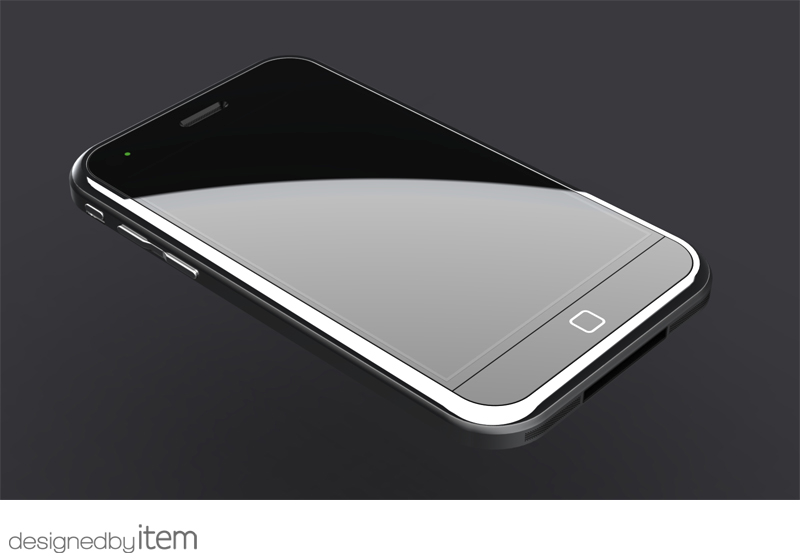
Apple has apparently started to cut down on the orders of Philips-sourced LED flash components, called Lumileds according to Apple tech website, Apple Insider.
A person familiar with Apple's supply's chain has told the site that Apple has greatly reduced orders for the Philips LED flash components over the past 30 to 60 days.
The source added that this may be due to the fact that Apple will not use the component in the forthcoming iPhone 5, while other leads point to a new supplier, possibly based in Taipei, that may instead be adopted.
While the camera and the flash modules on the iPhone 4 are part of the same component, it appears that Apple will separate both for the fifth generation iPhone 5 in order to improve the quality of pictures and reduce the dreaded red-eye effect.
Other reports have pointed out that Apple is going to use an eight-megapixel camera for the iPhone, a jump in pixel count that will allow it to close the gap on certain rivals like the Nokia N8 and some future Android-based smartphones that will even have 12-megapixel or higher camera resolution.
Taiwanese manufacturer Omnivision is rumoured to be the big winner in the allocation of OEM/ODM contracts, being set to acquire 90 per cent of orders.
Subscribe to:
Posts (Atom)